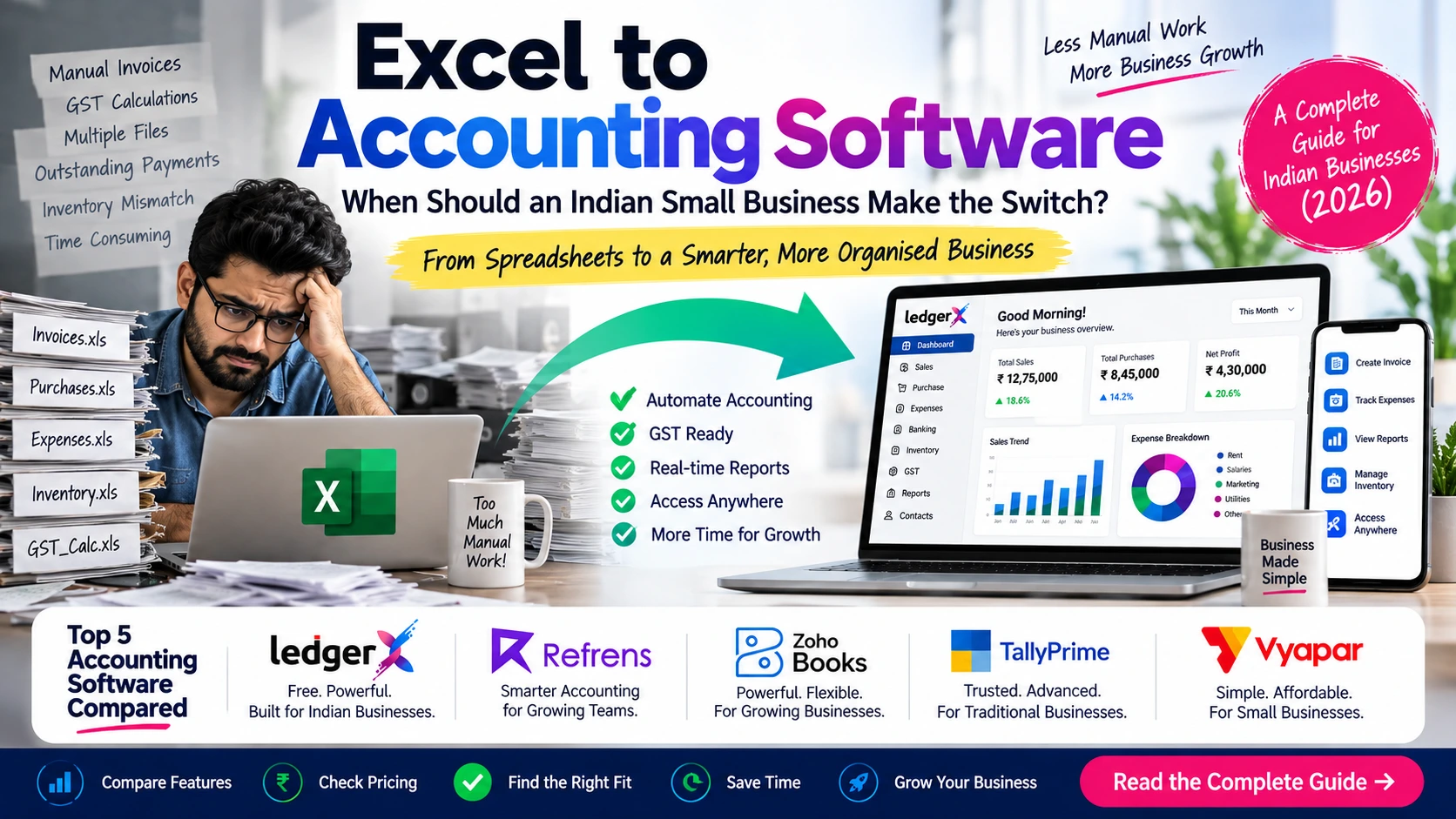
Excel to Accounting Software: When Should an Indian Small Business Make the Switch?
For many Indian small businesses, Excel is where accounting starts.
It is simple, familiar and inexpensive. A business owner can create a spreadsheet for sales, another for expenses, another for customer payments and another for stock. When the business is small, this may be enough.
But as transactions increase, managing business finances through multiple spreadsheets can become difficult.
GST calculations, invoices, purchases, expenses, inventory, outstanding payments, bank transactions and financial reports can quickly turn into a collection of interconnected Excel files.
That raises an important question:
When should a small business stop using Excel and move to accounting software?
There is no single answer for every business. If your transactions are limited and your accounting requirements are simple, Excel may still work. But if you are spending increasing amounts of time maintaining spreadsheets or struggling to get an accurate picture of your finances, accounting software can make a significant difference.
This guide explains the signs that your business may have outgrown Excel, what to look for before switching, and five accounting software options worth considering in India.
Why Do Small Businesses Start With Excel?
Excel remains popular because it is flexible and easy to understand.
A new business may not want to invest in accounting software immediately. Instead, the owner may use spreadsheets to record:
- Sales
- Purchases
- Expenses
- Customer details
- Supplier details
- Payments received
- Payments made
- Inventory
- GST calculations
- Monthly income and expenses
For a business with a small number of transactions, this can work.
The problem usually starts not when Excel stops working, but when the business becomes more complicated than the spreadsheet system built around it.
10 Signs Your Business Has Outgrown Excel
1. You Maintain Multiple Excel Files
If sales, purchases, expenses, inventory and customer payments are maintained in separate files, keeping everything synchronized becomes increasingly difficult.
A change in one place may need to be updated manually somewhere else.
2. GST Calculations Take Too Much Time
GST billing and reporting can involve multiple records and calculations.
If you are manually preparing GST-related information from spreadsheets, there is a greater possibility of missing information or entering incorrect data.
Accounting software designed for Indian businesses can bring GST-related billing and reporting into the same workflow.
3. You Spend Too Much Time Creating Invoices
Creating invoices manually is manageable when you issue only a few invoices.
As the number of invoices increases, repetitive data entry can consume valuable time.
Accounting software can connect invoicing with customer records, accounting entries and reports.
4. Tracking Outstanding Payments Is Becoming Difficult
Knowing who owes you money and how long it has been outstanding is important for cash-flow management.
With spreadsheets, ageing information may require manual calculations and regular updates.
Accounting systems can provide receivables and payables reports that make outstanding amounts easier to monitor.
5. Your Inventory Doesn't Match Your Records
If you sell physical products, maintaining inventory separately from sales and purchase records can become complicated.
You may find yourself asking:
- How much stock do I actually have?
- Which products are selling?
- What is the value of my closing stock?
- Which items need to be reordered?
- Does my physical stock match my records?
This is one of the points where dedicated accounting software can provide significant advantages over basic spreadsheets.
6. Your CA Needs Data Regularly
If you frequently send Excel files, invoices and other documents to your accountant or CA, collaboration can become inconvenient.
Cloud-based accounting software can allow authorised users to access the same financial records instead of repeatedly exchanging updated files.
7. Multiple People Need Access
An Excel file is not designed to be a complete multi-user accounting system.
As your team grows, you may need different employees to access different parts of your financial information.
Role-based user permissions can provide better control over who can view or modify accounting data.
8. Monthly Reports Take Hours to Prepare
If you need to manually prepare:
- Profit & Loss
- Balance Sheet
- Sales reports
- Purchase reports
- Expense reports
- Cash-flow information
- Outstanding reports
every month, your spreadsheet system may already be consuming too much time.
Accounting software can generate many of these reports directly from the underlying transactions.
9. You Can't Easily Access Your Accounts Outside the Office
If your accounting data exists primarily on one computer, accessing it while travelling or working remotely can be inconvenient.
Cloud accounting changes this by allowing authorised users to access business records through an internet-connected device.
10. You Are Spending More Time Managing Accounts Than Managing the Business
This may be the biggest sign of all.
Accounting should help you understand your business. It shouldn't become a separate administrative burden that takes hours every week.
When bookkeeping becomes repetitive and difficult to maintain, automation can help reduce the workload.
Excel vs Accounting Software: What's the Difference?
The biggest difference is that accounting software isn't simply a digital spreadsheet.
It connects different financial activities into a single system.
| Activity | Excel | Accounting Software |
|---|---|---|
| Sales recording | Manual | Integrated |
| Invoice creation | Manual | Built-in |
| GST calculations | Usually manual/formula-based | GST-focused workflows |
| Customer balances | Manual tracking | Automated records/reports |
| Purchase records | Separate sheets | Integrated |
| Expense tracking | Manual | Integrated |
| Inventory | Separate spreadsheets | Connected inventory records |
| Financial reports | Often manually prepared | Generated from transactions |
| User access | Basic file sharing | Role-based access |
| Remote access | Depends on setup | Available with cloud software |
| Data backup | User-managed | Usually cloud-based |
| Repetitive transactions | Manual | Automation available |
| Business insights | Spreadsheet analysis | Dashboards/reports/analytics |
Excel isn't necessarily the wrong choice.
The question is whether Excel is still appropriate for the complexity of your business.
What Should You Look For When Moving From Excel?
Before choosing accounting software, don't start with the price.
Start with your business requirements.
GST and Tax Compliance
Check whether the software supports the GST workflows your business actually needs, including GST invoicing, reports, e-invoicing and e-way bills where applicable.
Invoicing
Look for easy invoice creation, customer management, recurring invoices and payment tracking.
Accounting
Check whether it supports the accounting workflows required by your business and provides useful financial reports.
Inventory
If you sell physical products, inventory management can be critical.
Bank Reconciliation
For businesses with frequent bank transactions, reconciliation can reduce manual work.
Reports
At minimum, consider whether you can easily access:
- Profit & Loss
- Balance Sheet
- Sales reports
- Purchase reports
- Expense reports
- Cash flow
- Receivables
- Payables
Multiple Users
If your accountant, employees or business partners need access, check user management and permissions.
Cloud Access
Cloud-based software can be useful if you need to work from different locations or devices.
Automation
Recurring invoices, recurring entries and automated workflows can reduce repetitive work.
Data Migration
If you're already using Excel, check whether your new software allows you to import existing customers, suppliers, inventory and accounting data.
Five Accounting Software Options for Indian Businesses
There isn't one accounting platform that is ideal for every business.
The right choice depends on your industry, transaction volume, accounting requirements, budget and the features you actually need.
Here are five options worth considering.
1. LedgerX
LedgerX is a cloud-based accounting platform designed for Indian businesses, startups, SMEs, accountants and founders.
Its current platform includes GST billing, accounting, inventory, financial reports, automation and AI-powered insights. It also supports importing customers, suppliers, inventory and accounting data from Excel or other accounting software, which can be particularly relevant for a business moving away from spreadsheets.
Key Features
- GST billing
- GST reports
- GSTR-1, GSTR-3B and CMP-08
- E-invoice
- E-way bill
- TDS/TCS reports
- Profit & Loss
- Balance Sheet
- Cash-flow reports
- Sales and purchase reports
- Inventory management
- Closing stock valuation
- Item-wise stock ledger
- Item-wise profit analysis
- Recurring entries
- Accounting automation
- Custom ageing reports
- AI-powered business insights
- Multiple users
- Role-based access control
- Cloud access
- Data import from Excel and other accounting software
- Cloud backup and security
- Android app
LedgerX also provides AI-powered analysis of sales, expenses, cash flow and profitability, along with automated alerts and suggestions.
Pricing
LedgerX currently promotes its core accounting platform as 100% free, with unlimited invoices and users. Its pricing model states that usage-based charges may apply only after a very high usage threshold is exceeded.
Best For
- Startups
- Small businesses
- MSMEs
- Retailers
- Wholesalers
- Distributors
- Manufacturers
- Service businesses
- Accountants
- Founders
2. Refrens
Refrens is a cloud-based GST billing and accounting platform aimed at growing Indian businesses. Its approach combines financial management with automation and AI capabilities.
Key Features
According to the information provided for this comparison, Refrens includes:
- GST-compliant invoicing and billing
- Client billing and payment tracking
- Expense management
- Purchase management
- Bank reconciliation
- GSTR reports
- GSTR-2B reconciliation
- Automated bookkeeping
- Financial reports and dashboards
- Approval workflows
- Role-based access
- Project profitability tracking
- Client and vendor statements
- Built-in CRM
- Lead management
- Recurring invoices
- Refrens Eagle for AI-powered bill capture
- FREYA AI accounting assistant
- MCP connectivity with Claude and ChatGPT
One of its notable strengths is combining sales, billing and finance operations within the same platform, along with approval workflows and reporting designed to make financial information easier to access.
Best For
The supplied information positions Refrens particularly well for:
- Consulting firms
- IT service companies
- Marketing agencies
- Professional service providers
- Business service companies
- Growing service-based teams
3. Zoho Books
Zoho Books is a cloud accounting platform aimed at businesses that want accounting connected with other business applications.
It can be suitable for businesses that want a broader software ecosystem alongside accounting.
Common Features
Depending on the plan and configuration, businesses can use Zoho Books for:
- GST accounting
- Invoicing
- Expense management
- Purchase management
- Inventory
- Bank reconciliation
- Financial reporting
- Automation
- Customer management
- Vendor management
- Multi-user access
- Cloud accounting
- Mobile access
- Business integrations
Best For
Zoho Books can be worth considering for growing businesses that want cloud accounting combined with a wider business software ecosystem.
4. TallyPrime
TallyPrime remains a familiar choice for many Indian businesses and accountants, particularly businesses that prefer a traditional accounting environment with extensive accounting and inventory capabilities.
Common Features
- Accounting
- GST
- Invoicing
- Inventory
- Purchase management
- Sales management
- Financial reports
- Banking workflows
- Payroll capabilities
- Multi-user options
- Business reporting
- Compliance features
Best For
TallyPrime can be a strong option for businesses that already depend heavily on traditional accounting workflows, detailed inventory management and accountant-led processes.
For businesses moving from Excel, however, it is worth considering whether you specifically want a traditional accounting environment or a cloud-first workflow.
5. Vyapar
Vyapar focuses on making billing and business accounting accessible to small businesses.
It is particularly relevant to businesses that want simpler billing and accounting workflows and prefer mobile accessibility.
Common Features
- Invoicing
- GST billing
- Expense tracking
- Payment tracking
- Inventory
- Business reports
- Customer and supplier management
- Mobile access
- Business accounting tools
Best For
Vyapar can be suitable for small businesses, retailers, traders and business owners who want straightforward billing and accounting without the complexity of a larger accounting system.
Excel vs 5 Accounting Software Options
The following table provides a high-level comparison. Feature availability and pricing can vary by plan and may change, so businesses should verify the latest information with each provider before making a purchase decision.
| Feature | LedgerX | Refrens | Zoho Books | TallyPrime | Vyapar |
|---|---|---|---|---|---|
| Cloud-based | ✓ | ✓ | ✓ | Available options | ✓ |
| GST billing | ✓ | ✓ | ✓ | ✓ | ✓ |
| E-invoicing | ✓ | ✓ | ✓ | ✓ | ✓ |
| E-way bill | ✓ | ✓ | ✓ | ✓ | ✓ |
| Accounting | ✓ | ✓ | ✓ | ✓ | ✓ |
| Sales management | ✓ | ✓ | ✓ | ✓ | ✓ |
| Purchase management | ✓ | ✓ | ✓ | ✓ | ✓ |
| Expense management | ✓ | ✓ | ✓ | ✓ | ✓ |
| Inventory | ✓ | Limited | ✓ | ✓ | ✓ |
| Bank reconciliation | ✓ | ✓ | ✓ | ✓ | — |
| Financial reports | ✓ | ✓ | ✓ | ✓ | ✓ |
| GST reports | ✓ | ✓ | ✓ | ✓ | ✓ |
| AI capabilities | ✓ | ✓ | ✓ | Limited | — |
| Automation | ✓ | ✓ | ✓ | ✓ | ✓ |
| Recurring transactions/invoices | ✓ | ✓ | ✓ | ✓ | ✓ |
| Multi-user access | ✓ | ✓ | ✓ | ✓ | ✓ |
| Role-based access | ✓ | ✓ | ✓ | ✓ | — |
| Mobile access | ✓ | ✓ | ✓ | ✓ | ✓ |
| CRM capabilities | — | ✓ | Available through ecosystem | — | — |
| Excel/data import | ✓ | — | ✓ | ✓ | ✓ |
| Free option | ✓ | Limited | ✓ | — | ✓ |
| Best suited for | Indian businesses, MSMEs & accountants | Service businesses & growing teams | Growing businesses | Traditional accounting & inventory | Small businesses & retailers |
Which Accounting Software Should You Choose?
Instead of asking “Which is the best accounting software?”, a better question is:
Which software fits the way my business works?
If you're currently using Excel and want a free cloud solution
LedgerX can be worth considering, particularly if you need GST, accounting, inventory, reports, automation and AI features without an upfront subscription cost.
If you run a service-based business
Refrens may be particularly relevant for consulting firms, IT companies, agencies and other professional service businesses because of its combination of billing, accounting, project profitability, CRM and approval workflows.
If you want a broader cloud business ecosystem
Zoho Books is worth considering if accounting needs to work alongside other business applications.
If you prefer established traditional accounting workflows
TallyPrime remains a strong option for businesses that require extensive accounting and inventory functionality.
If you want simple billing and mobile-focused business management
Vyapar can be considered by small retailers and businesses looking for simpler accounting and billing workflows.
How to Move From Excel to Accounting Software
Switching doesn't have to mean rebuilding your accounts from scratch.
A practical migration process can look like this:
Step 1: Clean Your Excel Data
Remove duplicate customers, suppliers, products and unnecessary records.
Step 2: Identify What You Actually Need
Separate essential information from old data that no longer needs to be actively maintained.
Step 3: Select Your Accounting Software
Compare the software based on your actual requirements rather than simply choosing the platform with the longest feature list.
Step 4: Import Your Existing Data
Check whether your chosen software supports importing:
- Customers
- Suppliers
- Products
- Opening balances
- Inventory
- Accounting data
For example, LedgerX currently supports importing customers, suppliers, inventory and accounting data from Excel or other accounting software.
Step 5: Set Up Your GST and Business Details
Configure your business information, GST details, tax settings and invoice preferences.
Step 6: Add Your Team or Accountant
Create appropriate users and permissions if multiple people need access.
Step 7: Run Both Systems During the Transition
For a short period, you may choose to verify the new system against your existing records before completely moving away from Excel.
Step 8: Stop Using Excel for Daily Accounting
Once your records have been verified, make the accounting software your primary system.
Excel can still be useful for analysis, calculations and specialised tasks. The goal isn't necessarily to eliminate Excel — it's to stop using it as your primary accounting system when your business has outgrown it.
When Should You Actually Make the Switch?
There is no transaction count at which every business must move from Excel to accounting software.
A better indicator is complexity.
If you're running a very small business with limited transactions and straightforward records, Excel may still be sufficient.
But if you are regularly dealing with:
- GST billing
- Multiple customers
- Supplier payments
- Inventory
- Outstanding receivables
- Bank transactions
- Multiple employees
- Regular reporting
- Recurring transactions
- Remote access
- CA collaboration
then accounting software can make financial management considerably easier.
The earlier you organise your accounting workflow, the easier it generally becomes to maintain clean records as your business grows.
Final Takeaway
Excel isn't bad accounting software — it simply isn't designed to be a complete business accounting system.
For a very small business, a spreadsheet may be enough.
But once your business starts dealing with increasing invoices, GST requirements, inventory, customer payments, purchases, multiple users and regular financial reporting, maintaining everything manually can become inefficient.
At that point, moving to accounting software can help centralise your records, automate repetitive work and give you a clearer view of your business finances.
Among the options discussed here, LedgerX, Refrens, Zoho Books, TallyPrime and Vyapar each approach accounting differently. The right choice depends on your business type, workflow, required features and budget.
The important thing is not to choose software simply because it has the most features.
Choose the system that solves the problems that made you consider leaving Excel in the first place.
Frequently Asked Questions
Is Excel enough for small business accounting?
Excel can be sufficient for businesses with limited transactions and simple accounting requirements. As transaction volume and business complexity increase, dedicated accounting software can provide better automation, reporting and collaboration.
When should a small business stop using Excel?
Consider switching when you are struggling with GST, invoices, inventory, outstanding payments, multiple users, financial reports or maintaining multiple spreadsheets.
What is better than Excel for business accounting?
Accounting software is generally better suited when a business needs integrated invoicing, GST, bookkeeping, inventory, reporting, automation and multi-user access.
Can I move my Excel data to accounting software?
Many accounting platforms support importing business data. The exact information supported varies by software. LedgerX, for example, states that it can import customers, suppliers, inventory and accounting data from Excel or other accounting software.
Is cloud accounting better than Excel?
For businesses that need remote access, collaboration, automatic backups and centralised records, cloud accounting can be more convenient than maintaining accounting information in local Excel files.
Which accounting software is best for a small business in India?
There is no single best option for every business. LedgerX, Refrens, Zoho Books, TallyPrime and Vyapar target somewhat different business needs, so the best choice depends on your industry, accounting requirements, budget and preferred workflow.
Is free accounting software enough for a small business?
It can be, provided the free software includes the features your business actually requires. Before choosing a free plan, check limitations around users, invoices, inventory, GST, reports, integrations and data access.