GST Invoice Format in India 2026: Mandatory Fields, Rules, Types & Examples
For any GST-registered business, creating a proper invoice is an important part of everyday accounting. A GST invoice records the sale of goods or services, shows the applicable tax, identifies the buyer and seller, and provides the information needed for accounting and GST compliance.
But what exactly should a GST invoice contain?
What is the correct GST invoice format in India?
Which fields are mandatory?
What is the difference between a tax invoice, bill of supply, credit note and debit note?
And how can a small business create GST invoices without manually calculating taxes every time?
This guide explains everything you need to know about GST invoice format in India in 2026, with practical examples for small businesses.
Note: GST rules and compliance requirements can change. Always verify applicable requirements against current GST guidance before relying on them for compliance.
What Is a GST Invoice?
A GST invoice is a document issued by a registered supplier when supplying taxable goods or services.
It contains important information such as:
- Supplier details
- Customer details
- GSTIN
- Invoice number
- Invoice date
- Product or service description
- HSN/SAC code
- Quantity
- Taxable value
- GST rate
- GST amount
- Total invoice value
- Place of supply where applicable
- Reverse-charge information where applicable
For businesses, the invoice also becomes an important source document for accounting, sales tracking, receivables and tax reporting.
GST Invoice Format in India
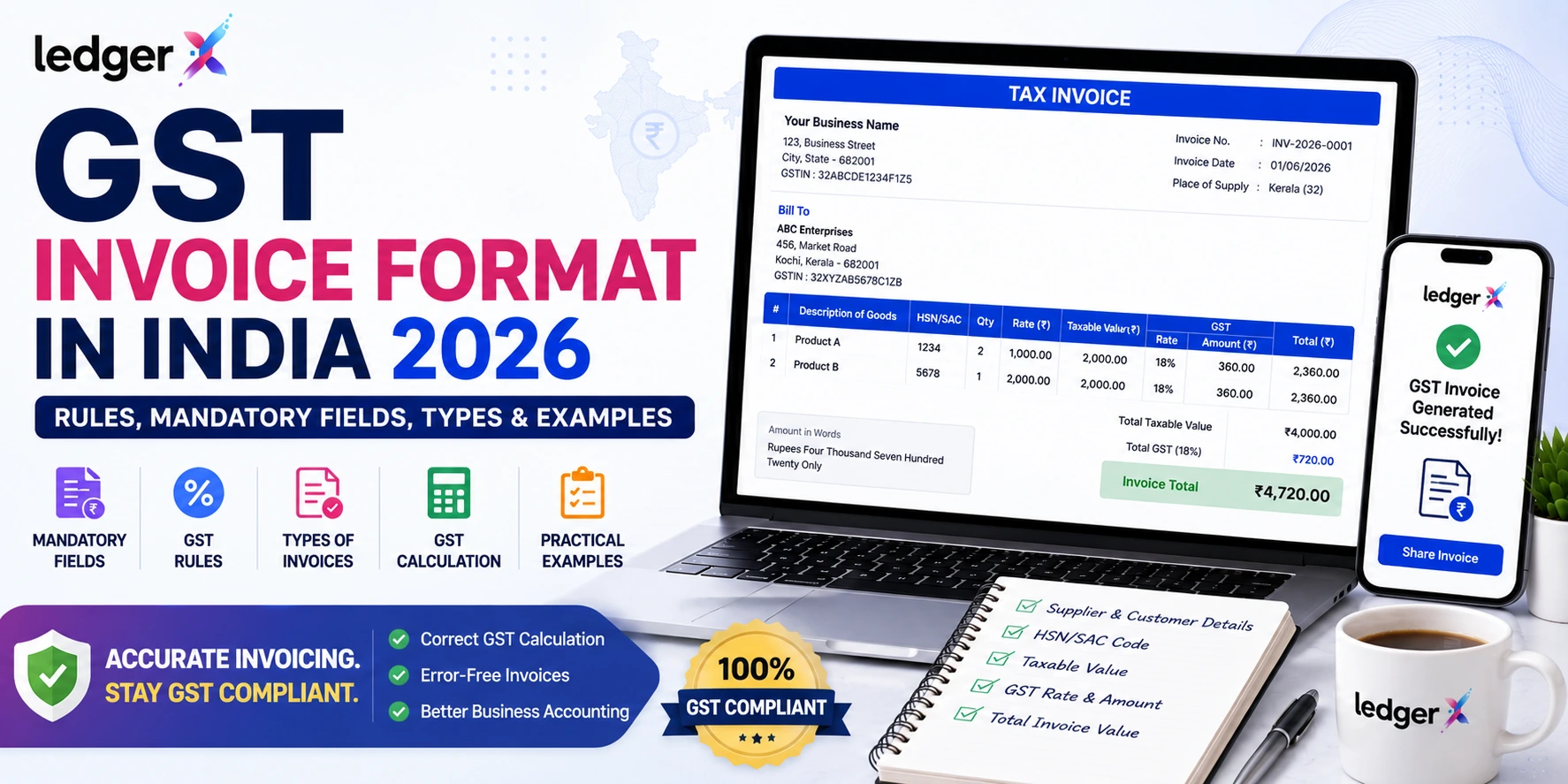
A typical GST invoice can be structured like this:
GST TAX INVOICE
Seller Details
- Business Name
- Business Address
- GSTIN
- Contact Details
Invoice Details
- Invoice Number
- Invoice Date
- Place of Supply
- Payment Terms
Customer Details
- Customer Name
- Customer Address
- Customer GSTIN, where applicable
Item Details
| Description | HSN/SAC | Qty | Rate | Taxable Value | GST | Total |
|---|---|---|---|---|---|---|
| Product A | 1234 | 2 | ₹1,000 | ₹2,000 | 18% | ₹2,360 |
| Product B | 5678 | 1 | ₹2,000 | ₹2,000 | 18% | ₹2,360 |
Taxable Value: ₹4,000
GST @ 18%: ₹720
Invoice Total: ₹4,720
The actual invoice structure can vary depending on the business, transaction type and applicable GST requirements.
Mandatory Fields in a GST Invoice
The GST invoice should contain the prescribed information required under the applicable GST rules.
Important fields include:
1. Supplier Name and Address
The invoice should identify the supplier issuing the invoice.
2. Supplier GSTIN
The supplier's GSTIN should be mentioned on the invoice where applicable.
3. Unique Invoice Number
The invoice should have a consecutive serial number within the applicable series and financial year requirements.
4. Invoice Date
The date on which the invoice is issued should be clearly mentioned.
5. Customer Details
The recipient's name and relevant address/GSTIN details should be included according to the transaction and recipient status.
6. HSN or SAC Code
The applicable HSN code for goods or SAC code for services should be included.
7. Description of Goods or Services
Clearly describe what was sold or supplied.
8. Quantity
For goods, the quantity and relevant unit information should be recorded.
9. Taxable Value
The taxable value after applicable discounts or adjustments should be shown.
10. GST Rate
The applicable GST rate should be clearly displayed.
11. GST Amount
The applicable CGST, SGST/UTGST or IGST amount should be shown separately as applicable.
12. Total Invoice Value
The final amount payable should be clearly displayed.
13. Place of Supply
Place-of-supply information is particularly important for applicable interstate transactions.
14. Reverse Charge
Where applicable, the invoice should indicate whether tax is payable under reverse charge.
15. Signature or Digital Signature
The applicable signature requirement should be followed.
For e-invoices, additional requirements such as the IRN and QR code apply when the e-invoicing provisions cover the transaction.
GST Invoice Example
Suppose a retailer sells a product for ₹10,000 and the applicable GST rate is 18%.
For an intra-state transaction:
Taxable Value: ₹10,000
CGST @ 9%: ₹900
SGST @ 9%: ₹900
Total GST: ₹1,800
Total Invoice Value: ₹11,800
For an applicable interstate transaction:
Taxable Value: ₹10,000
IGST @ 18%: ₹1,800
Total Invoice Value: ₹11,800
The actual tax treatment depends on the nature and location of the supply.
Types of GST Invoices
Businesses may encounter several types of GST-related documents.
1. Tax Invoice
A tax invoice is generally used for taxable supplies by registered businesses.
It records the taxable value and applicable GST.
2. Bill of Supply
A bill of supply is used in situations where a tax invoice is not applicable, subject to the relevant GST provisions.
3. Credit Note
A credit note may be issued in applicable situations such as returns, discounts or adjustments that reduce the original taxable value or tax.
4. Debit Note
A debit note may be issued when the taxable value or tax charged in the original invoice needs to be increased in an applicable situation.
5. E-Invoice
An e-invoice is generated through the applicable Invoice Registration Portal system for taxpayers and transactions covered by the e-invoicing requirements.
The IRP generates an Invoice Reference Number (IRN), and the applicable invoice carries the required QR code.
GST Invoice vs Regular Invoice
One of the common questions among new business owners is:
What is the difference between a GST invoice and a normal invoice?
A GST invoice contains additional tax-related information required for GST transactions.
| Feature | Regular Invoice | GST Invoice |
|---|---|---|
| Business details | ✓ | ✓ |
| Invoice number | ✓ | ✓ |
| Product/service details | ✓ | ✓ |
| Taxable value | Sometimes | ✓ |
| GSTIN | Not necessarily | Applicable where required |
| HSN/SAC | Not always | Applicable |
| GST rate | Not necessarily | ✓ |
| GST amount | Not necessarily | ✓ |
| Place of supply | Not always | Applicable where required |
For GST-registered businesses, using a proper invoicing system can reduce the risk of missing important information.
How to Create a GST Invoice
You can create a GST invoice manually using Excel or a document template, but this becomes difficult when your business generates many invoices every day.
A typical process is:
Step 1: Add Your Business Details
Enter your business name, address and GSTIN.
Step 2: Add Customer Details
Enter the customer's name, address and GSTIN where applicable.
Step 3: Add Products or Services
Enter the description, HSN/SAC, quantity and price.
Step 4: Apply GST
Select the applicable GST rate.
Step 5: Calculate Tax
Calculate the appropriate CGST + SGST/UTGST or IGST depending on the transaction.
Step 6: Check the Invoice
Verify customer information, taxable value, tax rate and final amount.
Step 7: Generate and Share
Generate the invoice and send it to the customer.
For businesses generating invoices frequently, accounting or billing software can automate much of this process.
Common GST Invoice Mistakes
Even a simple invoice can contain mistakes.
Some common problems include:
Incorrect GSTIN
A wrong GSTIN can create reconciliation and compliance problems.
Incorrect HSN/SAC
Using an incorrect classification can result in incorrect tax treatment.
Wrong GST Rate
The applicable GST rate should be verified before issuing the invoice.
Incorrect Place of Supply
This can affect whether CGST + SGST/UTGST or IGST applies.
Duplicate Invoice Numbers
Invoice numbering should be properly controlled.
Incorrect Tax Calculation
Manual calculations can result in errors, especially when businesses process large numbers of invoices.
Missing Required Information
Missing mandatory information can make invoice management more complicated and may create compliance issues.
GST Invoice Using Excel vs Accounting Software
Many small businesses initially use Excel for billing.
Excel can work when transaction volume is very low, but it becomes difficult to maintain as the business grows.
| Excel Billing | Accounting Software |
|---|---|
| Manual calculations | Automated calculations |
| Manual customer records | Customer database |
| Manual invoice numbering | Systematic invoice management |
| Difficult to track outstanding payments | Receivables tracking |
| Separate accounting records | Integrated accounting |
| Manual reports | Automated reports |
| Higher risk of duplicate data | Centralized data |
This is why businesses often move from spreadsheets to dedicated billing and accounting software as transaction volume increases.
How LedgerX Helps With GST Billing
LedgerX is a cloud-based accounting platform designed for Indian businesses. It combines accounting, GST billing, invoicing, expenses, inventory and financial reporting in one platform.
With LedgerX, businesses can manage:
- GST invoicing
- Sales
- Purchases
- Expenses
- Customers
- Suppliers
- Inventory
- Bookkeeping
- Profit & Loss
- Balance Sheet
- GST-related reports
- E-invoice and e-way bill workflows
LedgerX also provides cloud access, allowing businesses to work without relying on traditional desktop-only accounting software.
Why Use GST Billing Software?
For a business generating only a few invoices, manual billing may seem manageable.
But as sales increase, billing software can help reduce repetitive work.
A good GST billing system can help you:
Save time
Reduce repetitive invoice preparation and tax calculations.
Reduce errors
Automate calculations instead of manually calculating every invoice.
Maintain customer records
Keep customer information organized.
Track sales
Connect invoices with sales records.
Monitor payments
Keep track of outstanding customer balances.
Generate reports
Use transaction data to understand business performance.
Is Free GST Billing Software Enough for a Small Business?
For startups, freelancers, retailers and small businesses, paying for expensive accounting software may not always be necessary.
The important thing is not whether software is free or paid.
Instead, check whether it provides the features your business actually needs:
- GST billing
- Accounting
- Expense management
- Customer management
- Inventory
- Financial reports
- Cloud access
- Data security
- Scalability
- Support
LedgerX offers a free online accounting solution for Indian businesses with GST billing, bookkeeping, financial reports and other business-management capabilities.
GST Invoice Checklist
Before sending a GST invoice, quickly check:
☑ Supplier details are correct
☑ GSTIN is correct
☑ Invoice number is unique
☑ Invoice date is correct
☑ Customer details are correct
☑ HSN/SAC is correct
☑ Quantity and price are correct
☑ Taxable value is correct
☑ GST rate is correct
☑ CGST/SGST or IGST is correct
☑ Total invoice value is correct
☑ Place of supply is correct where applicable
☑ Reverse-charge information is included where applicable
☑ E-invoice requirements are followed where applicable
Frequently Asked Questions
What is the GST invoice format?
A GST invoice generally includes supplier and recipient details, GSTIN, invoice number, date, HSN/SAC, description, quantity, taxable value, GST rate, tax amount and total invoice value, along with other applicable particulars.
Can I create a GST invoice in Excel?
Yes, businesses can prepare invoices using Excel, provided the invoice contains the applicable required information and calculations are correct. However, dedicated billing software can reduce repetitive manual work.
Is GST invoice mandatory?
GST invoicing requirements depend on the nature of the supplier, transaction and applicable GST provisions. Registered businesses should follow the applicable invoice rules.
What is the difference between CGST, SGST and IGST?
For applicable intra-state supplies, CGST and SGST/UTGST are generally used. For applicable interstate supplies, IGST is generally used.
What is an e-invoice?
An e-invoice is an invoice reported to the applicable Invoice Registration Portal and authenticated through the prescribed process, resulting in an IRN and QR code when applicable.
Can small businesses use free GST billing software?
Yes. Small businesses can choose free billing or accounting software if it provides the features and compliance functionality they require.
Can LedgerX create GST invoices?
LedgerX provides GST invoicing and accounting functionality for Indian businesses, along with financial reporting and related GST workflows.
Final Thoughts
A properly prepared GST invoice helps your business maintain organized sales records and supports accurate accounting and GST processes.
For a small number of transactions, an Excel template may be sufficient. But when your business starts generating more invoices, managing customers, tracking expenses, monitoring inventory and preparing financial reports, dedicated GST billing and accounting software can make the entire process much easier.
LedgerX brings GST billing, bookkeeping, expenses, inventory and financial reporting together in a cloud-based platform built for Indian businesses.
Start managing your GST invoices and business accounting with LedgerX.